Dallas Makerspace maintains an assortment of semi-automatic and manual floor cleaners to help members properly clean up their messes after they make them. A clean space is a safe space and being excellent to one another starts with keeping the place clean so that the next person can start on their project without cleaning up messes left by others.
One of the pieces of equipment that we provide is the Tennant S5 Battery Powered Sweeper. This battery powered push sweeper is intended for use in the building, but, can be used on the parking lots and sidewalks. It is suitable for picking up dry, non-flammable dust and debris on dry hard floor and carpet surfaces. It is not suitable for wet surfaces or for picking up flammable or hazardous materials, and please take care to pick up all large debris from the floor before running the sweeper.
Step-by-step guide
- Disconnect the Sweeper from the Power Charger in the North Logistics area.
- Don the appropriate PPE for your comfort level. Sweeping up dirt, dust, and clay from the shop areas may cause irritation to your lungs depending on your allergies. Use a N-95 mask and safety glasses if you feel that you need it to use the machine safely.
- Check to make sure that the Main Hopper Bin is empty. To do this, you'll start by identifying the components that are required for this operation: knob with the handle (yellow), the bin release knob, and the molded hopper handle.
- Ensure that the machine is off.
- Using the yellow-balled handle on the main machine, move it left and right.
- below that, there's a smaller handle. Lift that handle up, and remove the hopper.
- If there's any dirt and debris in the hopper, dispose of them in a trash can with a liner.
- Ensure that the hopper is seated correctly, that the sweeper is not sitting on debris, and then turn the sweeper on by toggling the switch on the front side of the control panel. Usually, I'll select the middle of the three option modes: it runs the side brush as well as the main sweeper.
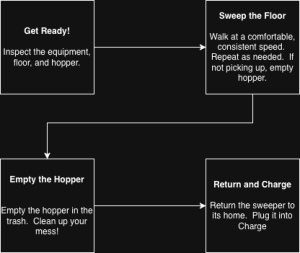
- Walk at a constant, comfortable pace – not too brisk, not too slow. If areas need a second pass, feel free to run the sweeper over it again. If the machine isn't picking up, follow the instructions in step 3 and empty the hopper.
- When finished, follow the instructions in step three and empty the hopper.
- Park the sweeper in its home in the North Logistics area, and plug the sweeper in to charge.
 |
Related articles
Related articles appear here based on the labels you select. Click to edit the macro and add or change labels.
