
Starting out - give major points + ask them questions
(their needs and interests, why they want to be members)
- Dallas Makerspace, one of the largest volunteer-only run makerspace in the country. Nobody gets paid to be here - we all volunteer to make this place opporate!
- 36,600 square feet facility - is 24/7, with access controlled by RFID keys
- Give how long you’ve been a member, perhaps what you like to do
- Set expectations for the tour. My job is just to walk you safely around, answer whatever questions I know, and help you sign up! But this place is huge and the tour could be 3 hours long if we do a deep dive into each space. So I'll be brief about some areas and more detailed about areas you've shared interest in. Just to be respectful of your time and ours.
- Non-profit: Committees, officers and a board is how we function (but save explaining it for orientation)
Path Example
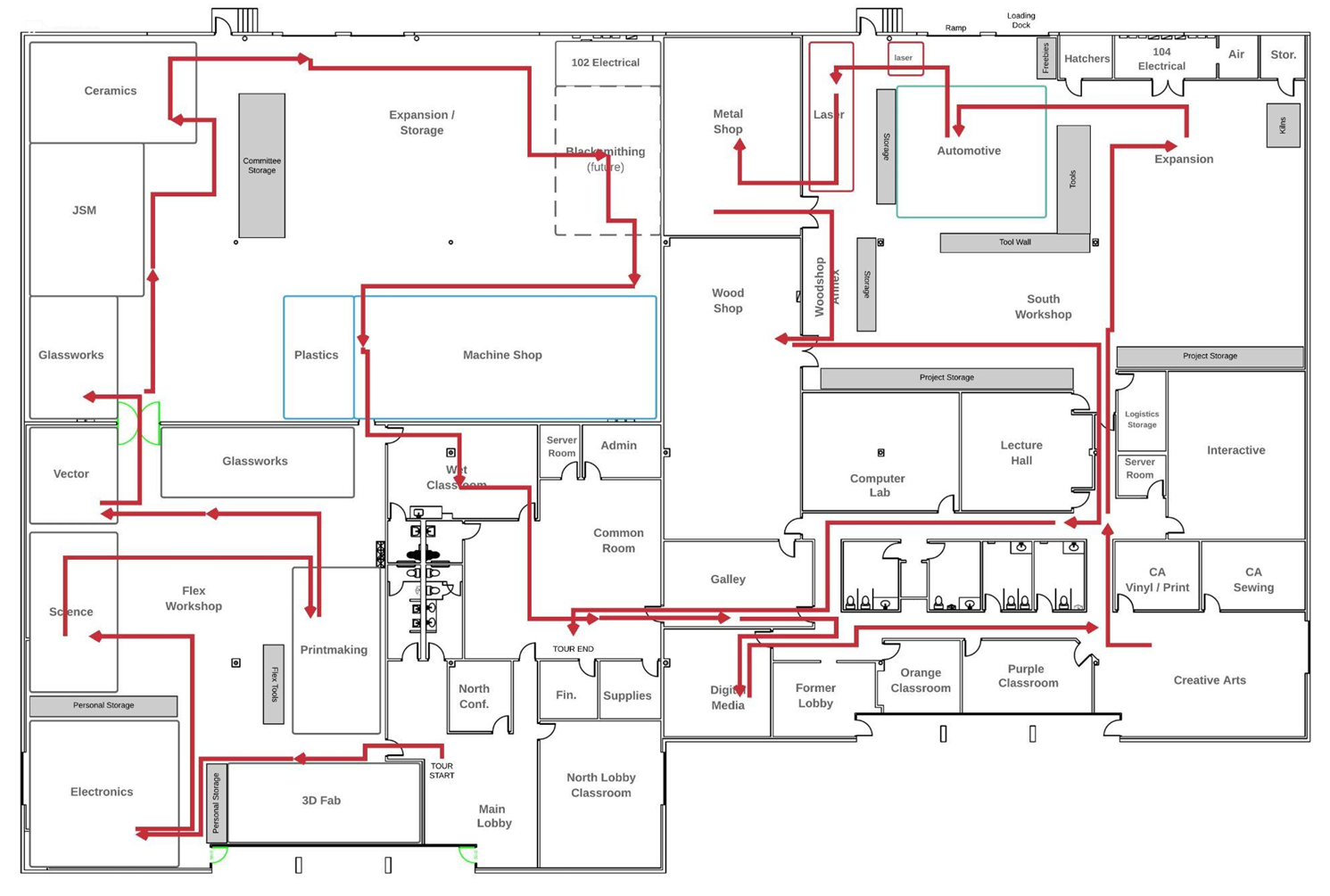
3D Fab
- Polyprinters are our most used printers - can use ABS, Ninjaflex and several others (we default to ABS, training is required for others)
- Show examples in display case (or bring them out and let people touch them)
- Training is online for both polyprinters and the elegoo resin
- Training for Bambu is in person
- No cost to print, bring your own filament
- Can use our filament in any color, as long as it's orange. Explain the tombstone / square kiosk and that several committees have them to have users pay for consumables
Flex Area
- Can work on anything here, just clean up after yourself
- Hand tools, power drops, but keep dusty/messy projects in woodshop work area.
Electronics
- Very “self serve” committee
- Amateur Radio
- Drones
- Scopes, bench gear, soldering stations
- often collaborate to help the electronics portions for members projects
Storage
Only area for personal storage - usually for keeping PPE or small items on site (safety glasses, tape, etc). $20 one-time
Science
- Agriculture / aeroponics
- Fusor - high-voltage electrostatic fusion (hydrogen -> helium)
- Lots of equipment - centrifuges, microscopes, glassware, reagents, etc.
- Previous classes: mushroom growing, lip balm, DNA extraction, basic radioactivity, electroplating.
- Chemicals are kept separate and requires the basic safety class to get access
Vector
- Vintage Electromechanical Conservancy of Technology, Operation, and Restoration
- PINBALL (and other arcade machines)
- Repair machines, visit shows, etc.
- Tiki machine - Paul Wilson - entire cabinetry and other details done here at DMS using the internals from another machine and restored. Won several awards.
- Dye sublimation moving here

Printmaking
- Screen Printing - bags, tshirts, paper, etc. We have 6-color and 4-color presses - have everything for making screens here
- Large “Wonkanator” Kluge press - Came out of the DFW airport! Sold at auction and was donated to us
- Letter prints / Block prints - We can use the lasers to lase out some of these, but we can’t do metal yet
- Larger prints - steam roller print events, we’ll hold one this fall (did you know they’ll let anybody rent one of those things?)
- Strictly nontoxic inks in the washout sink.
Glassworks COLD
- We only do “warm” processes here - we can’t maintain a glory hole furnace with volunteer power
- Stained glass, pendants, fusing - we can do all the shaping and cutting out here in this area and do the stained glass soldering as well
- For small objects we have microwave kilns to fuse glass
- The kilns and torches are in the back (glassworks part 2)
Glassworks HOT
- Kilns for Glassworks - show example of fusing and slumping into a plate
- Lampworking (beads, small amounts of blowing, etc)
- Molds and kiln wash are available
- There is a fee for firing that goes towards maintaining the kilns
Jewelry / Lapidary
- Jewelry always has several examples laid out
- Lapidary - cutting, polishing, and shaping of rocks
- Wire wrapping, beading, etc
- 3D printing wax resin - lost wax casting using our kilns and furnaces
- Jewelry benches - rotary tools, etc
- Torches for soldering are in the fire cabinet
- Kilns for firing molds and melting metals
- Two vacuum casting machines
- Polishing wheels
Ceramics
- One of the cheapest ways you can get into ceramics - classes provide clay and tools, so you can see if you like it
- We have the wheels for throwing, molds for slip casting, slab roller and molds for hand building
- Clay can be purchased from teacher. Community glazes available, just pay for what you use.
- We fire on site with a volunteer team (kiln team). We do mid-fire - bisque at 04, glaze at cone 6 and sometimes specialty firings that are voted on.
- Initial class (ceramics 100) to see how the processes work and where things are, and other classes for the different methods. The class is required to work in the space.
This is also where I usually talk about how committees meet once a month - show up and get involved - it helps you know how things work, and you get to work on cool projects together.
Motorsports
- As we pass their storage - we field a race car in a few endurance racing events - 24 hours of lemons ( racing for $500 race cars) and champ car
- We work on the car on-site (mid-90s Nissan 240sx). We will teach you how to race and how to work on the car
- It’s been into the wall a few times and blown several engines (which we usually have a few around the storage area)
Automotive
- 2-bay automotive
- We are a teaching shop - meaning we allow no commercial work, per our insurance. Must be cars you have “reasonable access” to
- Take-in / Take-out shop - anything that comes in with you (oil, fluids, crappy brake parts) also go out with you
- Need certified on 2-post and 4-post lifts, can either ask for training or show up to an autosports or automotive committee meeting
- offers DIY classes (how to change oil) or can help with inspections when buying a new car etc.
Blacksmithing
- An air conditioned forge! WHAT
- Currently have once-a-month open forges where people come and learn
- We also have more tools and an induction forge that can be used inside.
Machine Shop
- If people are working, lead the group outside the plexiglass. Otherwise you can walk them through
- Machine shop is for precise machining of metal parts and items, down to thousandths of an inch.
- We have the knee mills and lathes for machine work - and everyone always notices the HAAS 3-axis milling machine.
- Everything in machine shop requires some level of training - the Haas alone takes over 12 hours of training
- Have everything from rough-cutting on bandsaws and cold-cut saws, to fine work with
Many times, this is where I’ll bring up that while we provide some durable consumables (such as drill bits, taps, etc) in various areas, sometimes someone may accidentally break a piece of equipment that you wanted to use. We’re a learning organization, and sometimes that means there are mistakes or mistreated equipment
This is also why we discourage production commercial work -- you will probably be disappointed and stressed if you really need a piece of equipment to make 20 items you’ve already sold. Have an etsy store, etc! But, you probably want your own equipment if you’re running a business.
Plastics
- Plastics-only area that keeps it out of woodshop and machine show (wears on the tools differently).
- Special tools for cutting and bending plastics - including a vacuum-former
Galley
- Mini convenience store - scan and pay - run by Parks Pantry
- Access for short term food storage if you are staying for the day or pulling an all-nighter.
Common Room
- Race car simulator
- Printers
- Small photo light-box for photographing small projects
- Community computers
Digital Media
- Video and audio equipment available for use
- Computers and software for editing and rendering
- Lights and setups for both product photography and green screen shots
- Computers for game design and 3d in the computer classroom
Darkroom
- B+W Film processing, enlargers and a light table
Lecture Hall / Interactive/ Purple
- Bigger classrooms used for lectures, presentation based classes and a large room for teaching project-based classes with room to work.
- Purple classrooms - currently closed but being cleaned and reopened shortly: first volunteer project available - help with the remodel!
- We have other cool classes: ukulele, moss pole building, writing get togethers, etc
Creative Arts
- Fiber arts - knitting, weaving, spinning
- Painting / Acrylic pours
- Digital - vinyl cutters, dye sublimation (make cool customized stuff!), impact printer
- Sewing room - sewing machines, forms, embroidery, thor (leather sewing)
- Leatherworking - Thor, various hand tools and burnisher - big crossover with blacksmithing for knife sheaths
- Resins - Vacuum/Pressure pots for molds and resin curing
Sewing
- Domestic Baby-lock machines
- Industrial Jukis
- Walking foot - upholsetry
- Embroidery + Sergers
- Large tables
South Workshop Flex
- Construction / wood shop larger project storage
- Flex area with a larger selection of power and hand tools
- Power drops and work tables
- Storage
Woodshop
- Very full-featured woodshop. Have people put on safety glasses in orange box to the right of the door. If nobody is working and you can, turn off the felder and actually show the tour around. Otherwise I will generally talk about the tools in the shop while standing in the annex, and let folks peek in.
- Larger power tools, covered under our woodshop basics:
- Kapex compound miter saw
- 2 table saws, including a sawstop (drops the blade if you touch it)
- 3 band saws of various sizes
- Multiple sanding units, including a thickness sander
- Jointer / Planer
- Drill press
- LATHE ROOM 6 Lathes (separate class)
- Multicam - CNC router of 5’x10’x4” (separate class)
- Set expectations about current training - it can be hard to get into classes sometimes, but you may be able to work with someone.
- Most tools are interlocked - that is, you must scan in your RFID badge to actually power on the tool (feel free to demonstrate)
Metal Shop
- Powder coating oven
- CNC Plasma cutter - cuts up to ¾” steel (show examples)
- Multitude of tools - cutters, sanders, vapor hone, ring roller, bandsaw, presses.
- Welding - TIG, MIG, Stick, and spot welding. We supply gas, MIG wire costs to run
- No oxy-acetylene, various other rules like no galvanized metals - all taught with “hot process” class
Laser
- 5 lasers
- 3 Thunder lasers - including the larger unit - 130W CO2 lasers that can cut through ½” plywood (if you’re patient). Cannot cut metal, but can mark it
- Fusion laser - 60W CO2 laser - can do some finer engraving. Also has a very good rotary tool.
- Lasers charge for run-time, as the tubes are consumable - $1/5min, $2/5min
- Requires basic safety classes and online training.
Computer Lab and Common Room
- Walk back through the other hallway - ask trial close questions
Closing
Trial Close questions (use through-out the tour) or give a choice between two positive things people seemed to like.
"What was your favorite part (or fav so far)? The ability to come in here to work day or night, or the sense of a 3rd space and community that comes with it?" (or features besides immediate access to tools - since that takes time)
"So most people assume this place would cost a fortune to have a membership to! "...
Explain price using a price build up method. Comparing to other spaces or STEM or technical college access. But for membership to DMS you get: 24/7 access, 36,000 square feet, a community of almost 2000 members, workspaces, classrooms, access to classes and experts teaching skills and tools AND even the opportunity to teach classes in your area of expertise. Instead of that costing thousands or even hundreds its ONLY 72/mo. Isn't that awesome?!
Offer that they can sign up on their phones or at home, but as much as the facility is a labrinth of twists and turns - SO IS our online platforms, so most people are excited to have someone walk them through it!
Signup
So we'll start off on the computer (hopefully screens are logged in) pull up dallasmakerspace.org. Show them and go to JOIN.
After they have started filling out info, mention Hey, we actually have some discount codes, maybe you qualify for one. Are you a student, senior, military or first responder? Also if they want to add a family member to their account its only $21 a person. 16+
- As of April 2026 the student, senior, military and first responder discount offers a 33% ongoing discount, bringing the monthly rate down to $48 (regularly $72) or $518.67 annually (regularly $778).
First responders discounts:
First Responders are defined as those who qualify under the rules for the https://id.me website.
The Current promotion codes are available from your tour coordinator. If there questions or issues, please reach out to an Information Technology team member or our CTO.
Once they complete sign up, crash that screen and open a new page to dallasmakerspace.org and show them MEMBER PORTAL tiny in the top right corner, explain this is where they can access billing and shortcuts to common pages but go to Maker Manager to set up their badge. They use their login they just created and they can pick from a fob or card to activate. Click in the slot to enter numbers and set the card or fob on the square reader to have the numbers entered automatically.
If adding family members, you will create user name and password inside of maker manager (badges) and assign them separate badges.
Sign up common problems
- Waivers - Their name and email must match exactly on their waiver
- If they already have been a member, they should just use “forgot password” to access their old account, then “add service”
- Username must be all lowercase
- Suggest their password is something they can remember as they’ll need to type it in a lot
- Double-check addresses, zip codes, etc. The payment processor is strict about it, and we have a bunch of people who have just moved coming in
- Add-on Members - After purchasing on WHMCS, the username, password, etc. is assigned in maker manager under the badges
MINI ORIENTATION
- Don't just leave them here!!
- OK you're one of us now! yay! Let's make sure your badge works. - Have them stand up and try it on the supply closet. Remember how this place is run by volunteers? Yup thats you now too! If you make a mess or need to replace some paper-towels if you notice they are low. Here is where you will find those supplies! We all keep this place running smoothly.
- "Where do I start?" Lets get you signed up for your first class. Open up the website fresh again and show them EVENTS, have them login and then look for the first class available in their interest. SIGN them up for ORIENTATION if you see it up! Show them how to filter by category or new classes up.
- Sign them up for talk at least (different username/password) and if they want to get in touch with someone who teaches something specific how to look someone up and message them. Or just to start getting to know the space and community. (and get a leg up on the current drama)
Thank them for joining, excited to have them and tell them they are free to enjoy the space and come and go as they please. Maybe show them back to the space they were interested in and connect them with someone there and excuse yourself to help others/ give another tour.
